
Configurando ambiente desenvolvimento rails (Ubuntu 16.04)
Tarde pessoal!
Hoje vou mostrar como configuro meu ambiente rails de desenvolvimento.
Atualizando o repositório do apt-get
sudo apt-get update
Instalando e configurando GIT
sudo apt-get install git
git config --global user.name "Bruno Santos"
git config --global user.email "brunosps00@gmail.com"
Instalando RVM
sudo apt-get install software-properties-common
sudo apt-add-repository -y ppa:rael-gc/rvm
sudo apt-get update
sudo apt-get install rvm
Precisa colocar o usuário no grupo do RVM
sudo usermod -a -G rvm vagrant
Com usuário no grupo não esqueça de fazer um logout e login.
Após isso é necessário carregar o RVM para instalar o ruby.
source /etc/profile.d/rvm.sh
Checando instalação RVM
rvm -v
rvm 1.29.3 (manual) by Michal Papis, Piotr Kuczynski, Wayne E. Seguin [https://rvm.io]
Listando as versões do Ruby disponíveis pelo RVM
rvm list known

# MRI Rubies
[ruby-]1.8.6[-p420]
[ruby-]1.8.7[-head] # security released on head
[ruby-]1.9.1[-p431]
[ruby-]1.9.2[-p330]
[ruby-]1.9.3[-p551]
[ruby-]2.0.0[-p648]
[ruby-]2.1[.10]
[ruby-]2.2[.7]
[ruby-]2.3[.4]
[ruby-]2.4[.1]
ruby-head
Instalando ruby 2.4
rvm install 2.4
Checando versão do ruby
ruby -v
ruby 2.4.1p111 (2017-03-22 revision 58053) [x86_64-linux]
Instalando Rails 5
echo "gem: --no-document" >> ~/.gemrc
gem install rails
Finalizado checamos a versão do rails
rails -v
Rails 5.1.5
Com o git, o rvm e o ruby instalado podemos configurar nosso bash_profile para ficar mais “amigável”. Edite ou crie arquivo ~/.bash_profile da seguinte forma
ESC="\033" # This is the escape sequence
NO_COLOR="$ESC[0m"
IRED="$ESC[1;31m" # ANSI color code for intense/bold red
IGRN="$ESC[1;32m" # ANSI color code for intense/bold green

# From http://railstips.org/blog/archives/2009/02/02/bedazzle-your-bash-prompt-with-git-info/
# I had to change 'git-symbolic-ref' to 'git symbolic-ref'
function parse_git_branch {
  ref=$(git symbolic-ref HEAD 2> /dev/null) || return
  echo " ["${ref#refs/heads/}"]" # I wanted my branch wrapped in [], use () or <> or whatever
}

# from http://ariejan.net/2010/04/25/ruby-version-and-gemset-in-your-bash-prompt-yes-sir
function rvm_version {
  local gemset=$(echo $GEM_HOME | awk -F'@' '{print $2}')
  [ "$gemset" != "" ] && gemset="@$gemset"
  local version=$(echo $MY_RUBY_HOME | awk -F'-' '{print $2}')
  [ "$version" != "" ] && version="$version"
  local full="$version$gemset"
  [ "$full" != "" ] && echo "${full}:" # the colon at the end is a delimiter, you could use a space instead
}

#PS1="\h:\W \u\$" # For reference, here's the default OS X prompt
#export PS1="\$(rvm_version)\W \$(parse_git_branch)\$ " # Without the colors

# I had to put the \[ and \] down here, as opposed to $IRED, to avoid wrapping funkiness.
export PS1="\[$IRED\]\$(rvm_version)\[$NO_COLOR\]\w \[$IGRN\]\$(parse_git_branch)\[$NO_COLOR\]\n \$ "
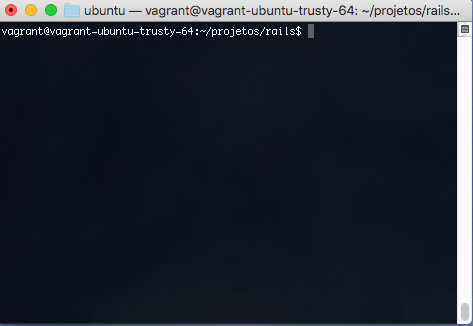
Terminal Antes
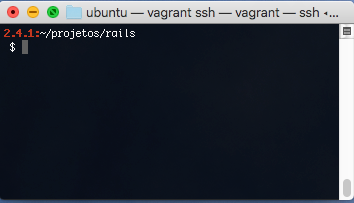
Terminal Depois
Com essa configuração já será possível começar a desenvolver com rails, no próximo post teremos como instalar e configurar o postgresql e o mysql para trabalhar com o rails.